Off-Road Camping Trailer v2
A custom flat-fronted, tapered-prow box trailer. This record holds the design spec, the drawing workflow, the toolchain, and the project assets.
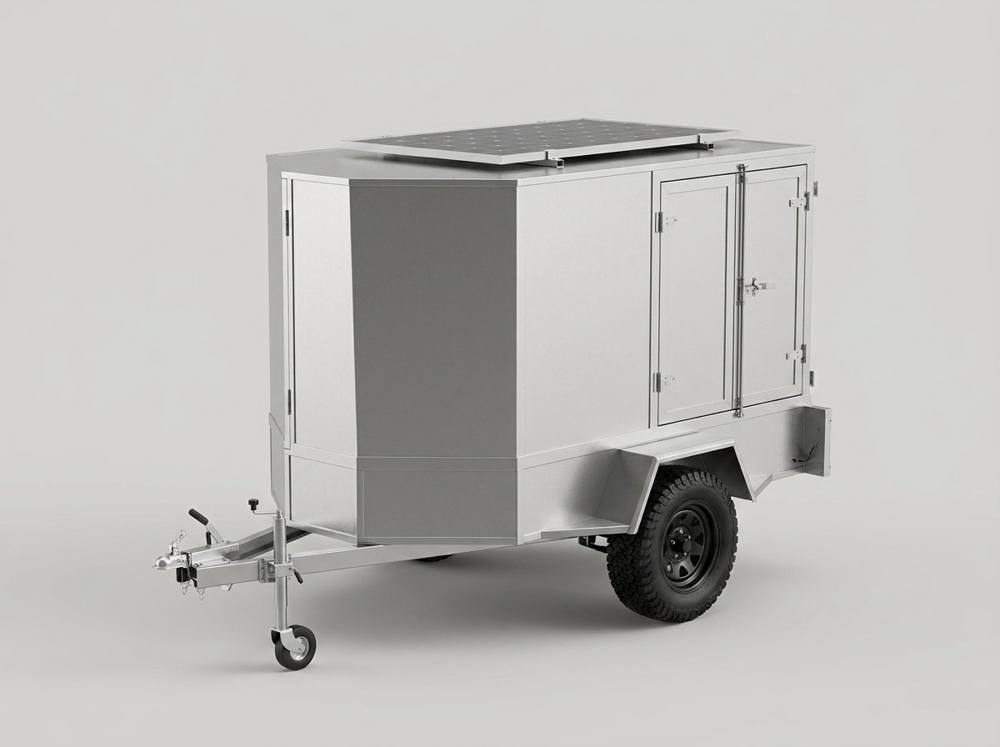
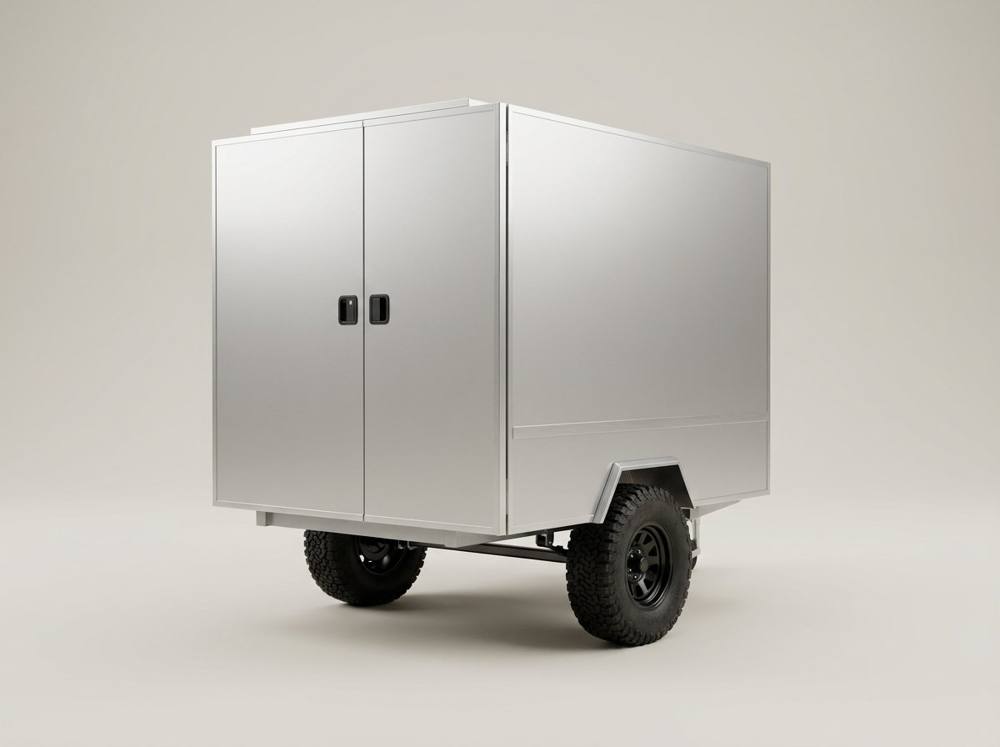
A steel-framed box camper clad in 4 mm aluminium composite panel (ACP) bonded to the frame, with a flat-fronted tapered nose. The body and nose are one continuous shell — the taper is in plan only; the form is full height throughout. Body 1500 × 1500 × 2000, 2500 overall, on a single off-road axle with externally-mounted wheels and a 550W roof solar panel.
How this evolved
This began as one line — "an architectural drawing of my camping trailer" — and the work visibly changed shape as the goal sharpened. That evolution is the point of keeping versions.
- Hand-drawn technical views. First reach was coded orthographic drawings. They kept drifting on precision — pixel geometry typed by hand compounds small errors.
- AI text-to-3D. Feeding the written spec to a generator produced a rounded blob (0/10). The lesson: generative models read intent, not millimetres — numbers contribute nothing.
- Real photos changed everything. Once you airdropped photos of the actual trailer, image-to-3D reconstructed the true shape, and the messy mesh repaired to watertight.
- Right tool per goal. Nano Banana image-to-image gave clean, on-spec pictures in seconds. A picture, an editable mesh, and a dimensioned CAD model are three different jobs — v3 covers the CAD route.
Detailed spec
All dimensions in millimetres.
Main body
| Width | 1500 |
| Height | 1500 |
| Length (rear box) | 2000 |
| Overall length | 2500 |
| Construction | steel frame + 4mm ACP |
| Cladding | bonded (glued) |
Tapered prow
| Nose depth | 500 |
| Flat front face | 430 wide |
| Face height | 1500 (full) |
| Position | centred |
| Taper plane | plan only |
Running gear
| Tyres | 265/70/16 |
| Diameter (approx) | ~780 |
| Axle from rear | 800 |
| Axle below base | 100 |
| Wheel mount | external / outboard |
Doors (three)
| Rear left leaf | 900 |
| Rear right leaf | 600 |
| Split | off-centre, full ht |
| Handles | 2 × RV paddle |
| Front door | RH tapered face |
Roof — solar
| Panel | 550W |
| Typical size | 2278 × 1134 × 35 |
| Mount | flat, centred F–B |
Trim (aluminium)
| Edge (top/btm/sides) | 25 wide |
| Vertical @ 2000 rear | 25 wide |
| Belt @ 600 base | 50 wide |
Drawing & render
For a dimensioned drawing the right tool is parametric CAD — AI image models approximate and will not hold exact millimetres. CAD draws the GA; the renderers handle photoreal.


Prompt → 3D / render
Tools that take the written prompt (or one reference image from it) and output an editable 3D model or a photoreal still. Best-accuracy path is the callout below.
Prompt → editable 3D model (GLB / FBX / OBJ)

Meshy 6
Text & image → 3D, PBR, topology control. Exports GLB/FBX/OBJ.
meshy.aiUsed for the model below


Prompt → photoreal still (not dimensional)


Clean renders — Nano Banana (image-to-image)
Made from your actual photos: image in, clean image out. A picture, not a 3D model — but fast and on-spec, and the right tool when you just want to see the trailer.
3D models — routes tested (v2)
Five routes from spec / photos to a renderable 3D model. The lesson: text-to-3D (A, A2) cannot hold the geometry; feeding the real photos (B–D) is what works — and Route B cleaned up best.
| Route | Engine | Input | Status |
|---|---|---|---|
| A — text-to-3D | Meshy | spec prompt | Rejected — 0/10 |
| A2 — text-to-3D (hardened) | Meshy | cuboid-first prompt + anti-curve negatives | Succeeded — still weak (text ceiling) |
| B — multi-image-to-3D | Higgsfield | 3 real photos | Best — repaired to watertight |
| C — multi-image-to-3D | Meshy 6 | 3 real photos (textured) | Succeeded — archived (9.5MB) |
| D — single-object (SAM-3) | Higgsfield | front ¾ photo | Failed |
Route A — rejected
Meshy text-to-3D from the spec prompt. 0/10 against the brief.
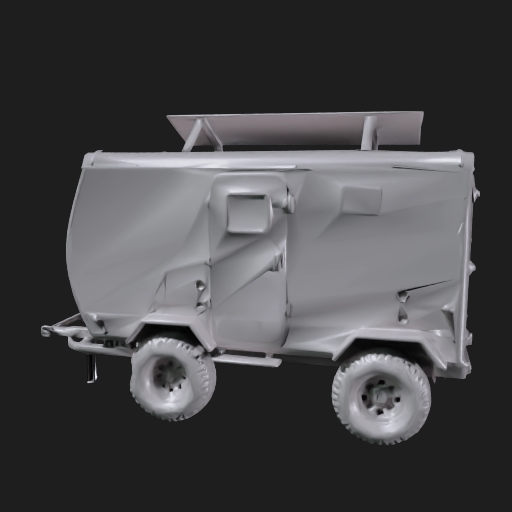
Route B — the winner (Higgsfield multi-image, from your photos)
Reconstructed from the three real photos — the closest result by far. Orbit to inspect.
Repaired — sharp edges
Corrected — watertight, 0 errors
Analysis — your "15 errors": correctable?
Yes — and most cleared automatically. The raw AI export was a soup of unmerged, duplicated faces (it looked solid but wasn't). A repair pass merged vertices and fixed normals and holes; a voxel remesh then forced it fully watertight.
| Stage | Broken faces | Boundary edges (holes) | Watertight |
|---|---|---|---|
| Raw AI export | 16,943 | 29,909 | No |
| After repair pass | 261 | 89 | No |
| After watertight remesh | 0 | 0 | Yes |
Assets
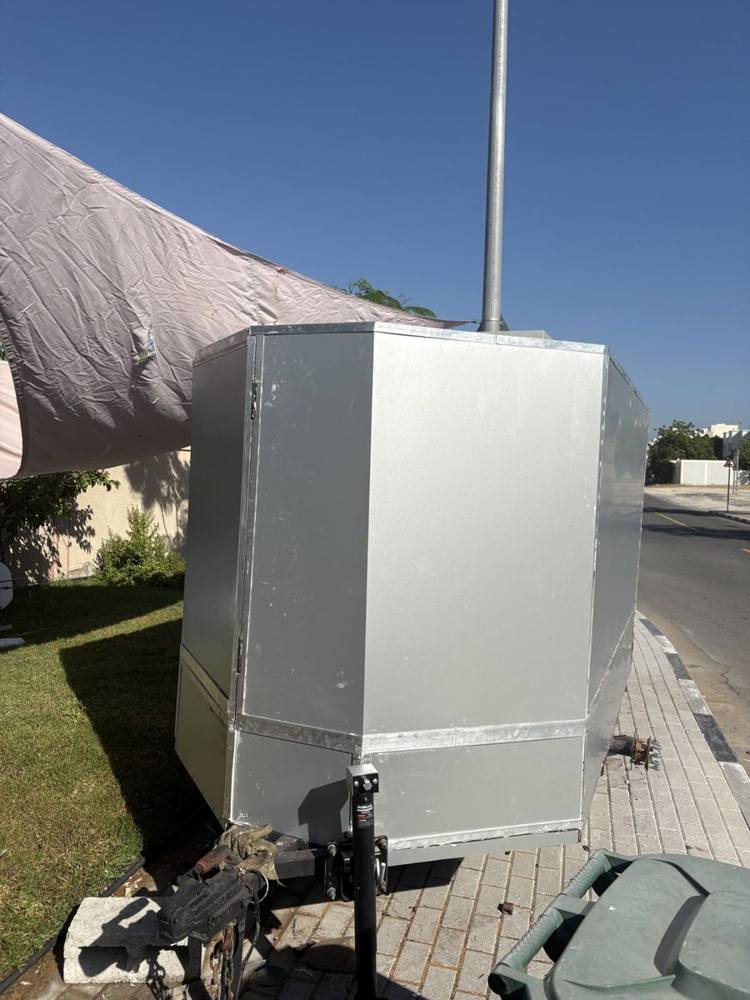
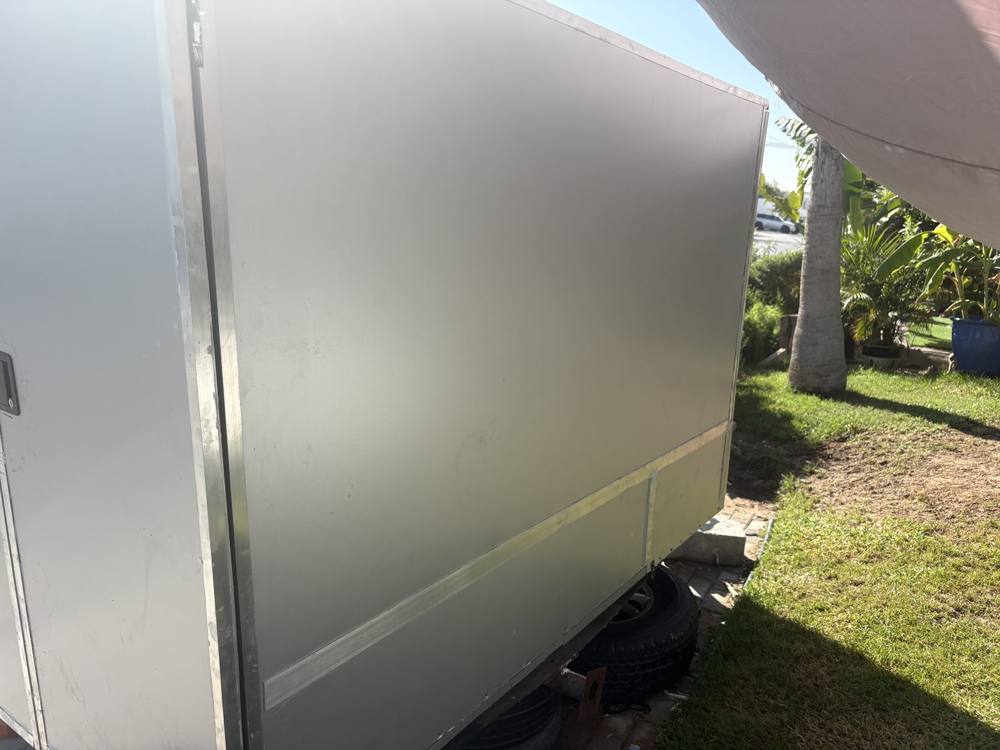
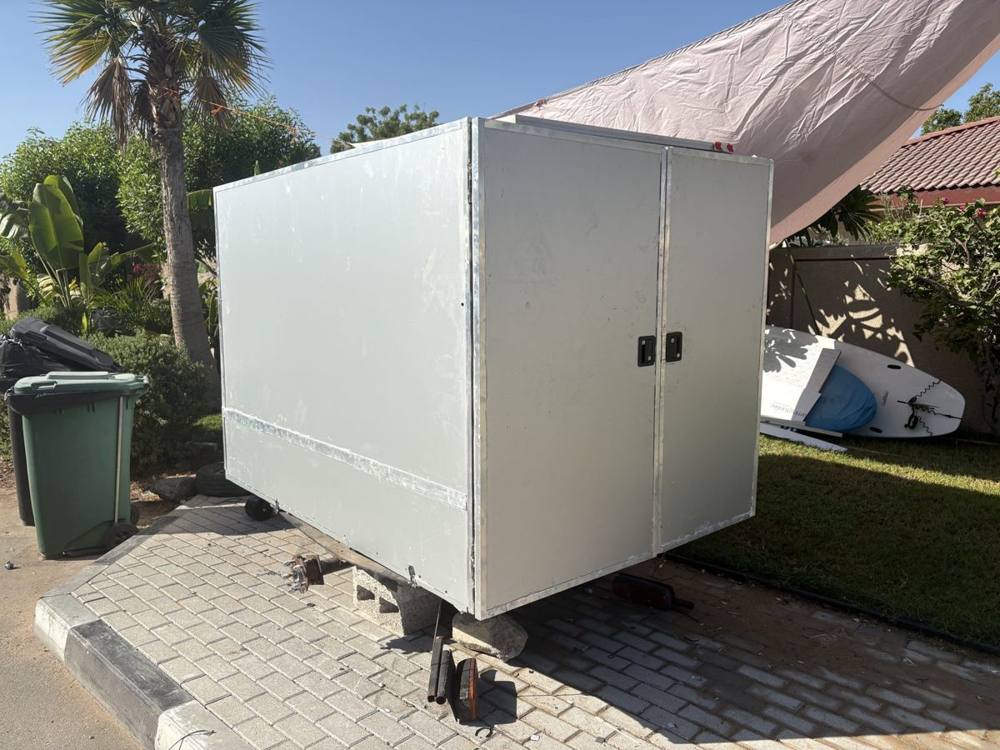
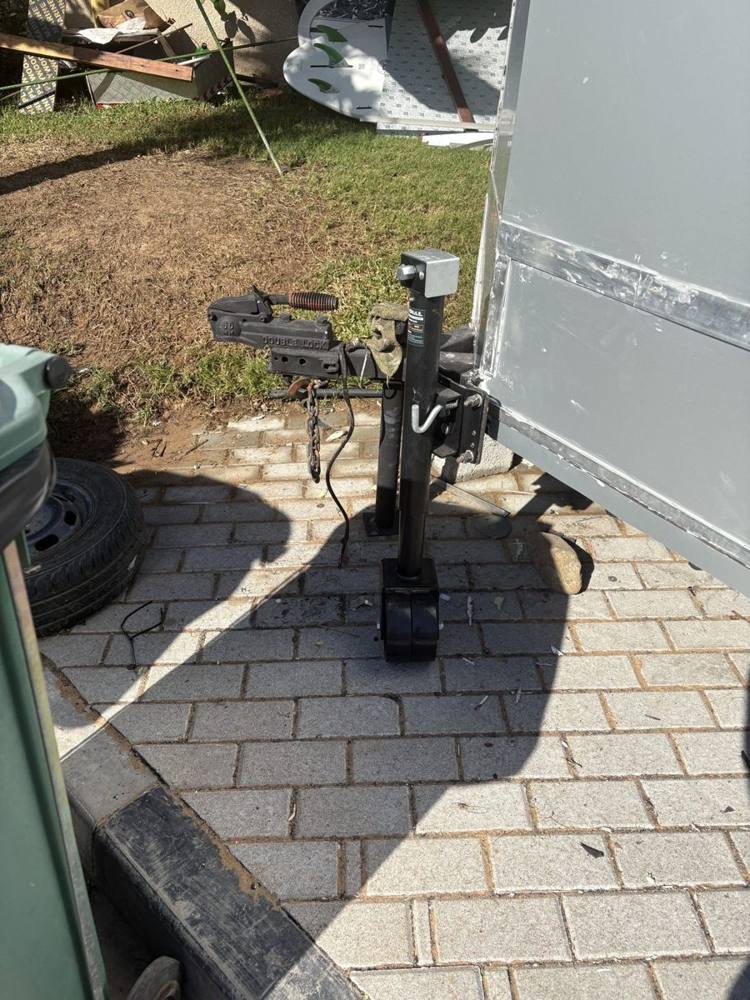
Trailer photos
The actual trailer — airdropped reference, and the input driving the image-to-3D pass.
Work log
- Session startBrief: architectural drawing of the trailer. Sourced 550W panel dimensions; surveyed AI render + CAD tooling.
- GeometryFlat-fronted tapered prow — 430 flat face, full height, centred; body + nose one continuous shell.
- Running gear265/70/16 single axle, 800 from rear, 100 below base. Corrected: wheels external / outboard, not under the floor.
- Openings & trimThree doors — rear barn pair 900 + 600 off-centre, full height, two RV handles. Edge / vertical / belt trim lines captured.
- RoofSolar revised 400W → 550W (2278 × 1134 × 35), centred front-to-back.
- ToolingHand-coded drawings drifted on precision. Decision: lock numbers in spec, model via prompt-to-3D, render in D5 / Twinmotion.
- 3D modelFirst mesh generated via Meshy text-to-3D from the spec prompt.
- This siteSpec, toolchain, model and assets logged; shipped to house style.